 Meziantou.Framework
Fonts
editAn embedded font shows any text it has the glyphs of, in any script. Load the font file once with PdfFont.Load, and use it like a standard font:
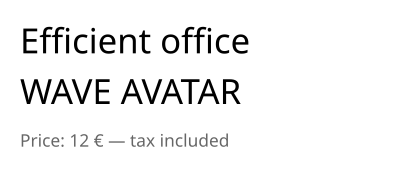
public static void DrawEmbeddedText(string fontPath, string outputPath)
{
    // A TrueType or OpenType font file: the document embeds the glyphs it shows
    var font = PdfFont.Load(fontPath);

    var document = new PdfDocument();
    document.Pages.Add(new PdfSize(300, 130)).CreateContentBuilder()
        .DrawText("Efficient office", font, 26, 15, 90) // the "ffi" and "ff" ligatures of the font
        .DrawText("WAVE AVATAR", font, 26, 15, 52) // kerning: the pairs "WA", "AV" and "TA" are tightened
        .SetFillRgb(0.4, 0.4, 0.4)
        .DrawText("Price: 12 € — tax included", font, 13, 15, 20);

    document.Save(outputPath);
}
What is embedded
- PdfFont.Load reads a
.ttf,.otf,.ttc,.woffor.woff2file, from a path or from bytes; thefaceIndexargument chooses a font of a collection (.ttc). PdfFont.FromFace takes a FontFace ofMeziantou.Framework.Fontsthat is already loaded. - Each document embeds the subset of the glyphs it shows, as a composite font. The subset is written when the document is saved, so it grows with the content until then. Rendering a page or extracting its text before the document is saved writes the subset as it is at that moment, so the page is drawn and read as it will be saved.
- The document also gets a
ToUnicodemap from the glyphs to their characters: the text can be extracted, searched and copied in readers. A text whose glyphs cannot give it back (a ligature, a right-to-left run) is marked with its replacement text. - A PdfFont does not belong to a document and is thread-safe: load it once, and use it in every document.
Shaping
The text is shaped with the OpenType layout tables of the font: ligatures, kerning, marks, and the complex scripts such as Arabic or Devanagari. It is ordered by the Unicode Bidirectional Algorithm, so a right-to-left text is shown in the right order. Use a font that has the glyphs of the script.
A text already shaped and laid out by another engine is shown with ShowGlyphs, in a text object: the glyph identifiers of the font at their positions, which are not shaped again, and the text they show so that it can still be extracted. ShowGlyphs needs a font loaded from a file, not a standard font.
Choose between a standard and an embedded font
A standard font keeps the file small, but only shows the characters of WinAnsiEncoding. CanEncode tells whether a font has a glyph for every character of a text:
// A standard font shows the characters of WinAnsiEncoding (Latin-1, the euro sign, the typographic quotes...)
var helvetica = PdfFont.GetStandardFont(PdfStandardFont.Helvetica);
var font = helvetica.CanEncode(text) ? helvetica : PdfFont.Load(fontPath);
Showing a character a font has no glyph for throws ArgumentException. The PDF/A and PDF/UA documents must embed their fonts: the standard fonts cannot be used.
Fonts that cannot be embedded
PdfFont.Load throws:
- InvalidFontException when the file is not a valid font;
- UnsupportedPdfFeatureException when its outlines cannot be embedded (CFF2 and bitmap fonts) or when its license does not allow embedding;
ArgumentOutOfRangeExceptionwhenfaceIndexis not a font of the file.
The instances of variable fonts are not embedded.