 Meziantou.Framework
Layout and geometry
editThe library lays the pages out as a browser does: blocks and inline text, floats, flexbox, grid, tables, positioning, multi-column, writing modes, SVG and MathML. The layout is internal: it runs when a web API needs the geometry, and its results are read through the APIs of the browsers.
using var context = new BrowsingContext(new BrowsingContextOptions
{
    Viewport = new ViewportOptions { Width = 800, Height = 600 },
});

var document = context.Navigate("https://example.com/", _ => """
    <!DOCTYPE html>
    <style>
      body { margin: 0 }
      header { height: 60px }
      .sidebar { position: absolute; top: 60px; width: 25%; height: 300px }
    </style>
    <header>Title</header>
    <div class="sidebar">Menu</div>
    """);

// The layout runs when the geometry is read
var sidebar = document.QuerySelector(".sidebar")!;
var rect = sidebar.GetBoundingClientRect();
Assert.Equal((0, 60, 200, 300), (rect.X, rect.Y, rect.Width, rect.Height));
Assert.Same(sidebar, document.ElementFromPoint(100, 100));

// A new viewport size lays the document out again
context.Viewport = new ViewportOptions { Width = 1200, Height = 600 };
Assert.Equal(300, sidebar.GetBoundingClientRect().Width);
The geometry APIs
| API | Returns |
|---|---|
| GetBoundingClientRect(), GetClientRects() | The border box of an element in the viewport, transforms included, or the boxes of each fragment (the lines of an inline element) |
| OffsetLeft, OffsetTop, OffsetWidth, OffsetHeight, OffsetParent | The position and the size of an element relative to its offset parent |
| ClientWidth, ClientHeight, ScrollWidth, ScrollHeight | The size of the padding box and of the scrollable area |
ElementFromPoint(x, y), ElementsFromPoint(x, y) | The element at a point of the viewport, found by the hit testing of the browsers |
Window.GetComputedStyle(element) | The used values: width: 50% reads as a length in pixels |
| CheckVisibility() | Whether the element is rendered and visible |
| InnerText | The text as rendered, with the line breaks |
The geometry is in CSS pixels. Changing the document, its styles or the viewport invalidates the layout, which runs again the next time a geometry API is called: read the geometry after a batch of changes, not between each change.
An iframe keeps its default size (300x150) whatever its document contains, unless both documents opt into responsive sizing: the iframe has frame-sizing: content-height (or another content-* value), and the embedded document has <meta name="responsive-embedded-sizing" content="allow-origins=*"> in its head (the list of the origins allowed to embed it). The iframe then takes the size of the contents of its document once the document is loaded, and again when its scripts call window.requestResize().
Sizing values
The sizing properties (width, height, their min-* and max-* limits, the logical inline-size and block-size properties, and flex-basis) accept the values of CSS Sizing 4: lengths and percentages, auto, min-content, max-content, fit-content, fit-content(<length-percentage>), stretch (and its prefixed names -webkit-fill-available and -moz-available), stretch(<length-percentage>), contain and calc-size().
stretch(<length-percentage>) sizes the margin box: the margins (auto margins count as zero) are taken off the argument, whatever the box-sizing, and the border box is never smaller than the borders and the paddings. With width: stretch(200px); margin-right: 20px, the border box is 180px wide. A percentage argument resolves against the containing block; when that size is not known, the value behaves as auto (as none for a maximum size). The margins do not apply to the table cells: the border box of a cell is the argument. stretch() values are interpolated by their argument in the animations and the transitions, and are not interpolated with the other sizing values.
Scrolling
Window.ScrollTo, Element.ScrollTo, Element.ScrollIntoView, ScrollTop and ScrollLeft scroll the viewport and the scroll containers, with the scroll events, the scroll snapping and the scroll anchoring. The user input scrolls too: the wheel, a panning touch and the keys (see User input).
Observers
ResizeObserver and IntersectionObserver report the changes of size and of visibility of the elements, and the lazy loading of the images and frames (loading="lazy") follows the viewport. They are run by the rendering updates of the event loop: run the event loop to get their callbacks (see Time and the event loop).
An observer created with TrackVisibility (Intersection Observer v2) also reports whether the target is visible (IsVisible): it is not when the target or an ancestor is transparent, filtered or transformed by more than a translation or an upscaling, or when content painted over the target covers a part of its intersection. The occluding content is what the page paints after the target: other boxes, text, images, the content of svg elements, and the parts of an element painted outside of its box, such as shadows (box-shadow, text-shadow), filters (blur(), drop-shadow(), SVG filters) and outlines. The content of the SVG elements can be observed as well.
Fonts and text
The text is measured with the fonts bundled with the library (Tinos for serif, Arimo for sans-serif, Cousine for monospace, metric-compatible with Times New Roman, Arial and Courier New), the web fonts of the page (@font-face), and, when you allow it, the fonts installed on the machine: see Fonts. The positions of the text are the same on every machine with the bundled fonts.
The hyphenation (hyphens) follows the typographic conventions of the content language (the lang attribute), which the browsers do not apply:
- The spelling changes at a hyphenation break: Dutch (
cafeetjeiscafé-tje), Hungarian (ÖsszegisÖsz-szeg), Pinyin (tú’ànistú-àn), Catalan (col·leccióiscol-lecció), and the 1901 German orthography (ZuckerisZuk-ker). - The hyphen of a compound word broken at its hyphen is repeated at the start of the next line in Pinyin and, with
hyphens: autoor a soft hyphen before the hyphen, in Bosnian, Croatian, Czech, Polish, Portuguese, Serbian, Slovak, Slovenian, Sorbian and Spanish (biało-czerwonyisbiało--czerwony).
SVG text in shapes
An SVG text element is laid out on one line, unless it is auto-wrapped: with inline-size, its lines are broken in a block of that width; with shape-inside, they are broken in shapes. The shapes are basic shapes (circle(), ellipse(), polygon(), path()...) or references to SVG shape elements (url(#id)), in the coordinates of the text. The text fills the first shape, then flows into the next ones:
using var context = new BrowsingContext(new BrowsingContextOptions
{
    Viewport = new ViewportOptions { Width = 360, Height = 200 },
    RenderingBackend = new ImagingRenderingBackend(),
});
var document = context.Navigate("https://example.com/", _ => """
    <style>body { margin: 0 }</style>
    <svg width="360" height="200" style="font: 13px sans-serif">
      <circle id="circle" cx="100" cy="100" r="90" fill="#e0f2fe" />
      <rect id="photo" x="20" y="70" width="70" height="60" fill="#94a3b8" style="shape-margin: 6px" />
      <rect id="box" x="200" y="10" width="150" height="180" fill="#fef3c7" />
      <!-- The text fills the circle around the photo, then overflows into the box -->
      <text style="shape-inside: url(#circle) url(#box); shape-subtract: url(#photo); shape-padding: 8px; text-align: center">
        The text of an SVG text element with shape-inside is wrapped in the shapes: the lines are broken where
        they fit, around the shapes of shape-subtract, and aligned by text-align. When the first shape is full,
        the text flows into the next one, and the text that does not fit in the last shape is not rendered.
      </text>
    </svg>
    """);
context.EventLoop.RunUntilIdle();

using var screenshot = context.TakeScreenshot();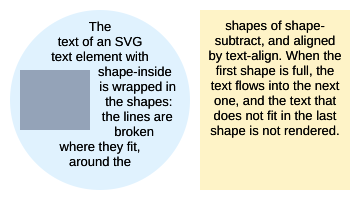
- A line box is placed where it fits in the shape, from its top: the edges of the shapes are sampled every pixel, and a line is broken into several segments when a shape or
shape-subtractcuts it. shape-paddinginsets the shapes, andshape-subtractremoves shapes from them, each expanded by its ownshape-margin(the one of the text element for a basic shape).- The segments are aligned by
text-align(justifywidens the spaces);text-anchorand thex,y,dx,dyandrotateattributes do not apply. The text that does not fit in the last shape is not rendered.