 Meziantou.Framework
Canvas
editWith a rendering backend, the canvas elements have a 2D context, as in a browser. The scripts of the page draw on it, and so can .NET, with the same API:
using var context = new BrowsingContext(new BrowsingContextOptions
{
    RenderingBackend = new ImagingRenderingBackend(),
    ScriptingEnabled = true, // as in a browser, a canvas shows its fallback content when scripting is disabled
});
var document = context.Navigate("https://example.com/", _ => """<canvas id="chart" width="320" height="160"></canvas>""");
context.EventLoop.RunUntilIdle();

// Without a rendering backend, GetContext("2d") returns null, as in a browser without canvas support
var canvas = (HtmlCanvasElement)document.GetElementById("chart")!;
var context2D = (CanvasRenderingContext2D)canvas.GetContext("2d")!;
context2D.FillStyle = "#f8fafc";
context2D.FillRect(0, 0, 320, 160);

double[] values = [40, 90, 65, 120, 80];
for (var i = 0; i < values.Length; i++)
{
    context2D.FillStyle = i == 3 ? "#ea580c" : "#0ea5e9";
    context2D.FillRect(20 + (i * 60), 140 - values[i], 40, values[i]);
}

context2D.StrokeStyle = "#334155";
context2D.LineWidth = 2;
context2D.BeginPath();
context2D.MoveTo(10, 141);
context2D.LineTo(310, 141);
context2D.Stroke();

using var screenshot = canvas.TakeScreenshot();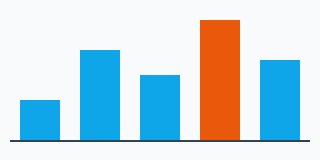
- CanvasRenderingContext2D has all the members of the canvas of the browsers: paths, rectangles, text, images, gradients and patterns, transformations, shadows, filters (the CSS filter functions, and the SVG
filterelements of the page referenced byurl(#id)), compositing, GetImageData and PutImageData. - The bitmap of a canvas has 8 bits per component by default. Request CanvasColorType.Float16 in CanvasRenderingContext2DSettings.ColorType to use half-float pixels. ToDataUrl() and ToBlob() serialize it as PNG, JPEG or WebP.
- The browsers hold the 8-bit pixels of a canvas multiplied by their alpha. The page paints a canvas with those values: a translucent pixel
(0, 128, 128, 254)is painted as(0, 127, 127)multiplied by its alpha (127.498 rounded), as in the browsers.GetImageData()still returns the straight colors. - The result of a filter that reads other pixels than the one it computes (a blur, a shadow, most SVG primitives) is rounded to 8-bit components multiplied by their alpha, as the browsers draw it on an 8-bit texture: the result of the same filter in a canvas and on an element of the page is the same. Color filters (
invert(),feColorMatrix...) are not rounded. - A canvas is rendered only when scripting is enabled: as in a browser, a page without scripting shows the fallback content of the
canvaselement. Set ScriptingEnabled (or give a script engine) when you draw from .NET. - OffscreenCanvas works the same way, also in the workers.
- Without a backend,
GetContext("2d")returns null, as in a browser without canvas support.
Gradient interpolation
The colors of the gradients of createLinearGradient(), createRadialGradient() and createConicGradient() are interpolated as in the CSS gradients of the browsers: in sRGB when all the color stops are legacy sRGB colors (#rgb, rgb(), hsl(), hwb(), the named colors), else in Oklab (for example a stop written with color(), oklch() or color-mix()). ColorInterpolationMethod sets the color space of the interpolation (srgb, srgb-linear, display-p3, lab, oklab, xyz, the polar hsl, hwb, lch and oklch...), and HueInterpolationMethod how the hues of the polar color spaces are interpolated (shorter, longer, increasing or decreasing), as the in <color-space> <hue> hue of the CSS gradients. These two properties implement a proposal (WEBPLATEXP0019, see Experimental APIs). As in the browsers, the colors of the canvas gradients are interpolated without premultiplying the alpha.
Wide-gamut colors
Request PredefinedColorSpace.DisplayP3 in CanvasRenderingContext2DSettings.ColorSpace to draw the colors of Display P3, whose gamut is wider than the one of sRGB, as in a browser:
- The CSS colors and the images keep their colors outside of sRGB. The Imaging backend decodes an image whose color profile is wider than sRGB (such as Display P3 or Adobe RGB), a PNG image tagged as Display P3 with a
cICPchunk, and a CMYK JPEG image a second time, without clipping, the first time a Display P3 or a half-float canvas draws it. The pages, which are sRGB, and the 8-bit sRGB canvases clip these colors. - GetImageData and PutImageData convert between the color space of the canvas and the one of the ImageData.
createImageBitmap()keeps the color space of a canvas or of an image data, and the colors of an image outside of sRGB: a bitmap drawn on a Display P3 canvas keeps them.- ToDataUrl() and ToBlob() serialize the pixels of the canvas in its color space: a PNG image is tagged as Display P3 with a
cICPchunk, a JPEG or WebP image with the ICC profile of Display P3.
Half-float pixels
The Imaging backend stores float16 canvases as half-precision floating-point pixels. GetContextAttributes reports that backing format, including after a resize or reset. Request ImageDataPixelFormat.RgbaFloat16 when reading pixels to retain their precision: the default readback is still rgba-unorm8.
PutImageData preserves half-float samples, including negative colors and highlights above one. Color-space conversion is performed before quantization and does not clip half-float colors to the destination gamut. Drawing images, creating image bitmaps, cropping, resizing and transferring an offscreen bitmap also retain floating-point pixels. PNG serialization uses 16-bit integer samples; values outside zero to one are clipped. Decoding these PNG images and creating image bitmaps from them retain their higher precision. Incomplete 16-bit PNG images retain the decoded rows and interlace passes at that precision; pixels not decoded remain transparent. JPEG and WebP use 8-bit samples.
Solid paints preserve floating-point colors. Gradients and intermediate layers, filters and shadows still use the drawing backend's 16-bit normalized colors. Drawing a floating-point image onto an 8-bit canvas clips its color channels to zero to one.
Layers
BeginLayer and EndLayer implement the canvas layers of the proposal that Chromium ships behind a flag: the drawings between the two calls are composited with each other, then drawn on the canvas as one image. In the layer, the global alpha, the compositing operator, the shadow, the filter and the clip region are reset; EndLayer() restores them and draws the layer with them:
using var context = new BrowsingContext(new BrowsingContextOptions
{
    RenderingBackend = new ImagingRenderingBackend(),
    ScriptingEnabled = true,
});
var document = context.Navigate("https://example.com/", _ => """<canvas id="circles" width="240" height="120"></canvas>""");
context.EventLoop.RunUntilIdle();

var canvas = (HtmlCanvasElement)document.GetElementById("circles")!;
var context2D = (CanvasRenderingContext2D)canvas.GetContext("2d")!;
context2D.FillStyle = "#f8fafc";
context2D.FillRect(0, 0, 240, 120);

// Left: each circle is drawn with the global alpha, so they show through each other.
// Right: the circles are drawn in a layer, which is drawn with the global alpha as one image.
for (var i = 0; i < 2; i++)
{
    context2D.Save();
    context2D.Translate(i * 120, 0);
    context2D.GlobalAlpha = 0.6;
    #pragma warning disable WEBPLATEXP0017 // The canvas layers are a proposal
    if (i == 1)
    {
        context2D.BeginLayer();
    }

    context2D.FillStyle = "#0ea5e9";
    context2D.BeginPath();
    context2D.Arc(45, 60, 35, 0, 2 * Math.PI);
    context2D.Fill();
    context2D.FillStyle = "#ea580c";
    context2D.BeginPath();
    context2D.Arc(75, 60, 35, 0, 2 * Math.PI);
    context2D.Fill();

    if (i == 1)
    {
        context2D.EndLayer();
    }
    #pragma warning restore WEBPLATEXP0017

    context2D.Restore();
}

using var screenshot = canvas.TakeScreenshot();
- The layers nest, and they share the stack of Save:
Restore()throws anInvalidStateErrorwhen the last saved state is a layer, andEndLayer()when it is not.Reset()discards the open layers. - The filter of BeginLayerOptions is a CSS filter, a CanvasFilter or the description of one, applied to the layer before the filter of the state, in the coordinates of the transformation matrix.
- While a layer is open, the pixels of the canvas cannot be read or replaced:
GetImageData(),PutImageData(),ToDataUrl(),ToBlob(),createImageBitmap()and drawing the canvas into another one throw anInvalidStateError. The page shows the pixels drawn before the layer was opened. - The API is experimental (
WEBPLATEXP0017, see Experimental APIs); the scripts of the page use it without restriction.
Filter objects
A CanvasFilter describes a filter with a list of SVG filter primitives instead of CSS filter functions. It is the Filter of a context, or the filter of a layer. Each primitive is a dictionary whose name is gaussianBlur, dropShadow, colorMatrix, componentTransfer, convolveMatrix or turbulence, and whose other entries are the attributes of the SVG primitive (stdDeviation, dx, floodColor, funcR, kernelMatrix, baseFrequency...). The primitives apply in sRGB, except turbulence, whose noise is generated in linearRGB as the one of feTurbulence:
using var context = new BrowsingContext(new BrowsingContextOptions
{
    RenderingBackend = new ImagingRenderingBackend(),
    ScriptingEnabled = true,
});
var document = context.Navigate("https://example.com/", _ => """<canvas id="filters" width="360" height="120"></canvas>""");
context.EventLoop.RunUntilIdle();

var canvas = (HtmlCanvasElement)document.GetElementById("filters")!;
var context2D = (CanvasRenderingContext2D)canvas.GetContext("2d")!;
context2D.FillStyle = "#f8fafc";
context2D.FillRect(0, 0, 360, 120);

#pragma warning disable WEBPLATEXP0021 // The CanvasFilter objects are a proposal
// A blur along the X axis only
context2D.Filter = new CanvasFilter(new Dictionary<string, object?> { ["name"] = "gaussianBlur", ["stdDeviation"] = new[] { 8, 0 } });
context2D.FillStyle = "#0ea5e9";
context2D.FillRect(30, 30, 60, 60);

// A blue shadow, then the colors are posterized: each component is rounded to 3 levels
var posterize = new Dictionary<string, object?> { ["type"] = "discrete", ["tableValues"] = new[] { 0, 0.5, 1 } };
context2D.Filter = new CanvasFilter(new object[]
{
    new Dictionary<string, object?> { ["name"] = "dropShadow", ["dx"] = 8, ["dy"] = 8, ["stdDeviation"] = 4, ["floodColor"] = "#1e3a8a" },
    new Dictionary<string, object?> { ["name"] = "componentTransfer", ["funcR"] = posterize, ["funcG"] = posterize, ["funcB"] = posterize },
});
var gradient = context2D.CreateLinearGradient(140, 0, 220, 0);
gradient.AddColorStop(0, "#ea580c");
gradient.AddColorStop(1, "#facc15");
context2D.FillStyle = gradient;
context2D.FillRect(140, 30, 80, 60);

// Noise: the turbulence replaces the drawings
context2D.Filter = new CanvasFilter(new Dictionary<string, object?> { ["name"] = "turbulence", ["baseFrequency"] = 0.05, ["numOctaves"] = 2 });
context2D.Rect(260, 20, 80, 80);
context2D.Clip();
context2D.Fill();
#pragma warning restore WEBPLATEXP0021

using var screenshot = canvas.TakeScreenshot();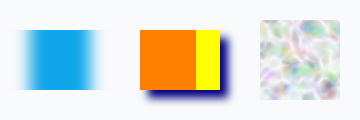
- The primitives apply in the order of the list, in sRGB. A pair of numbers (
stdDeviation,baseFrequency) is one number, used for both axes, or a list of two numbers. - The values are converted as Chromium converts them: a number can be a string or
null("10"is 10,nullis 0), and a primitive without a name, or with an unknown name, is ignored. An invalid value (a number that is not finite, a color that cannot be parsed, a negative frequency...) throws a TypeErrorException;BeginLayer()then does not open the layer. - The scripts create them with
new CanvasFilter({ name: "gaussianBlur", stdDeviation: 5 }). Reading thefilterof a context returns theCanvasFilterthat was set, and a CSS filter that is not valid does not replace it. - The API is experimental (
WEBPLATEXP0021, see Experimental APIs): it implements a proposal that Chromium ships behind a flag.
Drawing HTML elements
HtmlCanvasElement.Content and DrawElementImage implement the HTML-in-canvas proposal that Chromium ships behind a flag: the children of a canvas whose content attribute is drawable are laid out but not painted, and its descendants that have a drawable attribute are drawn into the canvas, with their styles, their effects and their text:
using var context = new BrowsingContext(new BrowsingContextOptions
{
    RenderingBackend = new ImagingRenderingBackend(),
    ScriptingEnabled = true,
});
var document = context.Navigate("https://example.com/", _ => """
    <canvas id="card" width="240" height="120" content="drawable">
      <div drawable id="label" style="width: 136px; padding: 8px 12px; border-radius: 8px; background: #0ea5e9; color: white; font: bold 16px sans-serif">
        HTML drawn in a canvas
      </div>
    </canvas>
    """);

var canvas = (HtmlCanvasElement)document.GetElementById("card")!;
var label = document.GetElementById("label")!;
var context2D = (CanvasRenderingContext2D)canvas.GetContext("2d")!;
#pragma warning disable WEBPLATEXP0023 // HTML-in-canvas is a proposal

// The paint event fires once a rendering update recorded the snapshot of the drawable element
canvas.OnPaint = _ =>
{
    context2D.Reset();
    context2D.FillStyle = "#f8fafc";
    context2D.FillRect(0, 0, 240, 120);
    context2D.Translate(120, 60);
    context2D.Rotate(-Math.PI / 12);
    context2D.DrawElementImage(label, -80, -26);
};
canvas.RequestPaint();
#pragma warning restore WEBPLATEXP0023

// Run the rendering update (a timer of the event loop)
do
{
    await context.EventLoop.RunUntilIdleAsync(CancellationToken.None);
}
while (await context.EventLoop.WaitForNextTimerAsync(CancellationToken.None));

using var screenshot = canvas.TakeScreenshot();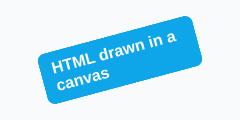
- The children of the box of a canvas whose
contentisdrawable(also the children of a child that isdisplay: contents) are blockified and statically positioned. - A canvas whose
contentisdrawableis a stacking context, as each of its drawable elements, which is also the containing block of all its descendants and establishes an independent formatting context (the margins of its children do not collapse through it). The snapshot of an inline drawable element on several lines draws all its fragments, from the union of their border boxes, with its positioned descendants (also the fixed positioned ones, which it contains). - Each rendering update records a snapshot of each drawable element (its stacking context with its CSS transform, in the coordinates of its border box before the transform, without its drawable descendants), then fires the
paintevent (CanvasPaintEvent) at the canvases whose drawable elements changed, in reverse tree order. RequestPaint fires it at the next rendering update even when nothing changed.DrawElementImage()draws the last snapshot, and throws anInvalidStateErrorbefore the first one. - A snapshot refers to the canvases of the element (as in Chromium):
DrawElementImage()draws their current bitmap, so the drawings made by thepaintevent of a nested canvas, which fires first, are drawn with the snapshot recorded by the same rendering update, and a change of their bitmap fires thepaintevent of the canvas. An element image (CaptureElementImage) keeps the bitmaps of the time it was captured. A canvas that is not origin-clean (tainted by cross-origin data) is not drawn. - The default size of an element image is the size of its border box scaled by the ratio of the size of the bitmap to the size of the canvas (GetElementImageDefaultSize). The source rectangle of
DrawElementImage()can extend beyond the border box to include the ink overflow. DrawElementImage()sets the canvas transform of the element to where it is drawn, unless DrawElementImageOptions.PreserveElementGeometry is true: the geometry of the element (GetBoundingClientRect()...) and its hit testing (ElementFromPoint(), the pointer events) follow the drawing (also the parts of an inline element split around block-level descendants, and the blocks split out of it, unless they are drawable elements themselves). UpdateElementGeometry, ClearElementGeometry and GetElementTransform set and read it. The elements whose geometry was never set are not hit tested.- CaptureElementImage returns the last snapshot as an ElementImage, which can be drawn later, also by the OffscreenCanvas of the canvas in a worker (it is transferable): the geometry updates of an
OffscreenCanvasare applied in the event loop of the canvas, which fires anelementgeometryupdateevent. - The snapshots paint the cross-origin images and iframes and the colors of the visited links: the proposal excludes them (read-back-allowed rendering), the library does not yet (it only excludes the canvases tainted by cross-origin data). WebGL and WebGPU are not supported, so
texElementSubImage2D()anddrawElementImageToTexture()are not available. - The API is experimental (
WEBPLATEXP0023, see Experimental APIs); the scripts of the page use it without restriction.
Text clusters
TextMetrics, returned by MeasureText(), implements the text clusters and the selection APIs of the proposal that Chromium ships behind a flag. The measured text keeps its glyphs, its font, its text styles, its direction, its alignment and its baseline, so an editor or a text animation can draw it one piece at a time, and place a caret or a selection on it:
using var context = new BrowsingContext(new BrowsingContextOptions
{
    RenderingBackend = new ImagingRenderingBackend(),
    ScriptingEnabled = true,
});
var document = context.Navigate("https://example.com/", _ => """<canvas id="text" width="240" height="60"></canvas>""");
context.EventLoop.RunUntilIdle();

var canvas = (HtmlCanvasElement)document.GetElementById("text")!;
var context2D = (CanvasRenderingContext2D)canvas.GetContext("2d")!;
context2D.FillStyle = "#f8fafc";
context2D.FillRect(0, 0, 240, 60);
context2D.Font = "32px sans-serif";

#pragma warning disable WEBPLATEXP0024 // The text clusters are a proposal
// The clusters are the grapheme clusters of the text: the "e" and its combining acute accent are one cluster
var metrics = context2D.MeasureText("Cafe\u0301s");
var clusters = metrics.GetTextClusters();
Assert.Equal(5, clusters.Count);
Assert.Equal(3u, clusters[3].Start);
Assert.Equal(5u, clusters[3].End);

// Drawing all the clusters at the same point draws the text as FillText(), here each one in its own color
string[] colors = ["#0ea5e9", "#ea580c", "#16a34a", "#9333ea", "#dc2626"];
for (var i = 0; i < clusters.Count; i++)
{
    context2D.FillStyle = colors[i];
    context2D.FillTextCluster(clusters[i], 10, 40);
}

// The caret positions and the selection, relative to the alignment point of the text
Assert.Equal(1u, metrics.GetIndexFromOffset(clusters[1].X + 1));
var selection = metrics.GetSelectionRects(0, 2);
Assert.Single(selection);
Assert.Equal(clusters[2].X, selection[0].Width, 1e-9);
#pragma warning restore WEBPLATEXP0024

using var screenshot = canvas.TakeScreenshot();
- GetTextClusters returns the clusters of the text in logical order: its grapheme clusters (an emoji sequence, a letter and its combining marks), merged when a glyph spans several of them (a ligature). The position of a cluster is its alignment point relative to the alignment point and to the baseline of the text; the options give another alignment or baseline.
- FillTextCluster and StrokeTextCluster draw a cluster with the font and the text styles of the measurement, and with the fill or stroke style, the transformation and the clip of the context at that time. Drawing all the clusters at the same point draws the same pixels as
FillText(). - GetIndexFromOffset returns the caret position under a point, GetSelectionRects the rectangles of a selection (one per bidi run, of the height of the font), and GetActualBoundingBox the bounding box of the glyphs of a range. The indexes are in UTF-16 code units, as in JavaScript.
- As in the browsers, each glyph of a stroked text is stroked on its own: the strokes of overlapping glyphs are composited, instead of stroking their union, so stroking the clusters one by one draws the same pixels as
StrokeText(). - The API is experimental (
WEBPLATEXP0024, see Experimental APIs); the scripts of the page use it without restriction.
Shaped text
ShapeText implements the shaped text that Chromium ships behind the same flag, meant to replace the text clusters of TextMetrics: the text is shaped once, and its glyph runs are drawn later with the font, the text styles, the direction, the alignment and the baseline of the context when it was shaped:
using var context = new BrowsingContext(new BrowsingContextOptions
{
    RenderingBackend = new ImagingRenderingBackend(),
    ScriptingEnabled = true,
});
var document = context.Navigate("https://example.com/", _ => """<canvas id="text" width="240" height="60"></canvas>""");
context.EventLoop.RunUntilIdle();

var canvas = (HtmlCanvasElement)document.GetElementById("text")!;
var context2D = (CanvasRenderingContext2D)canvas.GetContext("2d")!;
context2D.FillStyle = "#f8fafc";
context2D.FillRect(0, 0, 240, 60);
context2D.FillStyle = "#0f172a";
context2D.Font = "32px sans-serif";
context2D.TextAlign = CanvasTextAlign.Center;

#pragma warning disable WEBPLATEXP0025 // The shaped text is a proposal
// The text is shaped once, with the font, the text styles and the alignment of the context at this time
var shaped = context2D.ShapeText("Shaped");
context2D.Font = "10px serif";

context2D.FillGlyphRuns(shaped.GlyphRuns(), 120, 40);

// The positions are relative to the alignment point: here the center of the text
var clusters = shaped.GlyphClusters(1, 3);
Assert.Equal(2, clusters.Count);
Assert.Equal(-shaped.Width / 2, shaped.PositionToAdvance(0), 1e-9);
Assert.Equal(shaped.PositionToAdvance(1), clusters[0].X, 1e-9);
Assert.Equal(1u, shaped.AdvanceToPosition(clusters[0].X));
#pragma warning restore WEBPLATEXP0025

using var screenshot = canvas.TakeScreenshot();
- GlyphRuns returns the runs of the text from left to right (the glyphs of a bidi run with the same font), and GlyphClusters its clusters, as the text clusters of
TextMetrics. Their position is relative to the alignment point of the shaped text, and GetTextMetrics measures one of them. - FillGlyphRuns and StrokeGlyphRuns draw runs or clusters, the alignment point of their shaped text at the given point.
- AdvanceToPosition and PositionToAdvance convert between a caret position and a horizontal offset; SelectionRects and ActualBoundingBox are the ones of
TextMetrics. - No specification describes this API yet: it follows the IDL of Chromium. It is experimental (
WEBPLATEXP0025, see Experimental APIs); the scripts of the page use it without restriction. The JavaScript names ofCanvasShapedTextandCanvasGlyphRunareShapedTextandGlyphRun.